Pricing

10 free credits.
Then pay only for what it submits.

Aplies is priced in credits: 1 for each LinkedIn Easy Apply application, 2 for each application on a company’s careers site. Every plan runs the same Agent, at the same pace, with the same limits; a bigger plan brings more credits, and on monthly Executive and Signature they last longer.

You pay only for applications the Agent submits. If it stops before submitting, it costs nothing. Applying on company websites is optional and starts switched off — turn it on in the Agent whenever you want it.

Start with 10 free credits — no card. They unlock when you verify your phone on WhatsApp or Telegram.

Create your free account

Do you have a promo code?

Early access: code ⁨LAUNCH50⁩ is applied for you — 50% off your first payment on any plan or add-on.

The discount is for the first month or the first year only. After that, your plan renews at the regular price.

Light

$20
$10/m
Early Access 50% OffFirst month only — then ⁨$20⁩/month.

50 credits per month

  • 50 credits
  • 1 per Easy Apply · 2 per company site
  • Credits valid for 1 month
  • Auto-fill screening questions with AI
  • Job-title search optimization (loops)
  • Multi-lingual support
  • Company-page job applying
  • Remote jobs anywhere in the world
  • Performance checks & recommendations
  • Scheduled automatic applying
  • Last-24h jobs search
Get Light

Essential

$50
$25/m
Early Access 50% OffFirst month only — then ⁨$50⁩/month.

200 credits per month

  • 200 credits
  • 1 per Easy Apply · 2 per company site
  • Credits valid for 1 month
  • Higher speed than Light Plan
  • Less cooldown between applies
  • Everything in LightFeatures only — credits are not added together
Get Essential

Pro

Best seller
$100
$50/m
Early Access 50% OffFirst month only — then ⁨$100⁩/month.

450 credits per month

  • 450 credits
  • 1 per Easy Apply · 2 per company site
  • Credits valid for 1 month
  • Higher server priority
  • High-intelligence AI model
  • Fast apply speed
  • Less cooldown between applies
  • Priority customer support
  • Refined writing
  • Everything in EssentialFeatures only — credits are not added together
Get Pro

Executive

Recommended
$150
$75/m
Early Access 50% OffFirst month only — then ⁨$150⁩/month.

700 credits per month

  • 700 credits
  • 1 per Easy Apply · 2 per company site
  • Credits valid for 1+1 month
  • Unused credits carry-over for 1 extra month*
  • Super Fast apply speed
  • Less cooldown between applies
  • Account manager
  • One advisory call
  • Everything in ProFeatures only — credits are not added together
Get Executive

Signature

Best saving
$200
$100/m
Early Access 50% OffFirst month only — then ⁨$200⁩/month.

1,000 credits per month

  • 1,000 credits
  • 1 per Easy Apply · 2 per company site
  • Credits valid for 1+2 months*
  • Unused credits carry-over for 2 extra months*
  • Highest server priority
  • Cutting edge AI intelligence
  • Ultra Fast apply speed
  • Less cooldown between applies
  • Refined & prestigious writing
  • 2 advisory calls
  • VIP account manager
  • Everything in ExecutiveFeatures only — credits are not added together
Get Signature

*90% of your remaining credits carry over to the next period. T&C apply.

Taxes may be applied.

Compare

What changes between plans?

The credits and how long they last, plus a person to help on Executive and Signature. The Agent, its pace and its limits are the same on every plan.

Feature
Light
Essential
Pro
Executive
Signature
Credits
50 · 1 per Easy Apply · 2 per company site
200 · 1 per Easy Apply · 2 per company site
450 · 1 per Easy Apply · 2 per company site
700 · 1 per Easy Apply · 2 per company site
1,000 · 1 per Easy Apply · 2 per company site
Price
$20/m
$50/m
$100/m
$150/m
$200/m
Last-24h jobs search
✓
✓
✓
✓
✓
Credits validity
1 month
1 month
1 month
1+1 months
1+2 months
Monthly credits carry over
—
—
—
1 extra month
2 extra months
Carry-over credits (monthly plans)
—
—
—
90% per extra month
90% per extra month
Server priority
Medium
Medium
High
High
Highest
AI model intelligence
Medium
Medium
High
High
Cutting edge
Writing style
—
—
Refined
Refined
Refined & prestigious
Cooldown between applies
Up to 90s
Up to 60s
Up to 45s
Up to 30s
Up to 5s
Average apply speed
Moderate
Moderate
Fast
Super fast
Ultra fast
Remote jobs anywhere in the world
✓
✓
✓
✓
✓
Auto-fill screening questions with AI
✓
✓
✓
✓
✓
Job-title search optimization (loops)
✓
✓
✓
✓
✓
Performance checks & recommendations
✓
✓
✓
✓
✓
Scheduled automatic applying
✓
✓
✓
✓
✓
Multi-lingual support
✓
✓
✓
✓
✓
Company-page job applying
✓
✓
✓
✓
✓
LinkedIn search and Easy Apply
✓
✓
✓
✓
✓
Company career sites (soon)
✓
✓
✓
✓
✓
Match score, with your own minimum
✓
✓
✓
✓
✓
Asks you when it isn't sure
✓
✓
✓
✓
✓
Your answers saved for later forms
✓
✓
✓
✓
✓
Application report and CSV export
✓
✓
✓
✓
✓
AI included, no key of your own
✓
✓
✓
✓
✓
Add credits any time
✓
✓
✓
✓
✓
Priority customer support
—
—
✓
✓
✓
Account manager
—
—
—
✓
VIP
Advisory calls
—
—
—
1
2
How credits work

When does an application cost a credit?

When it is submitted — by the Agent, or by you during its run. Anything that stops before Submit costs nothing.

1credit for each LinkedIn Easy Apply application

LinkedIn’s own application form, filled in and submitted by the Agent.

2credits for each application on a company’s careers site

Company career sites are off until you turn them on in the Agent.

  1. Reserved just before Submit

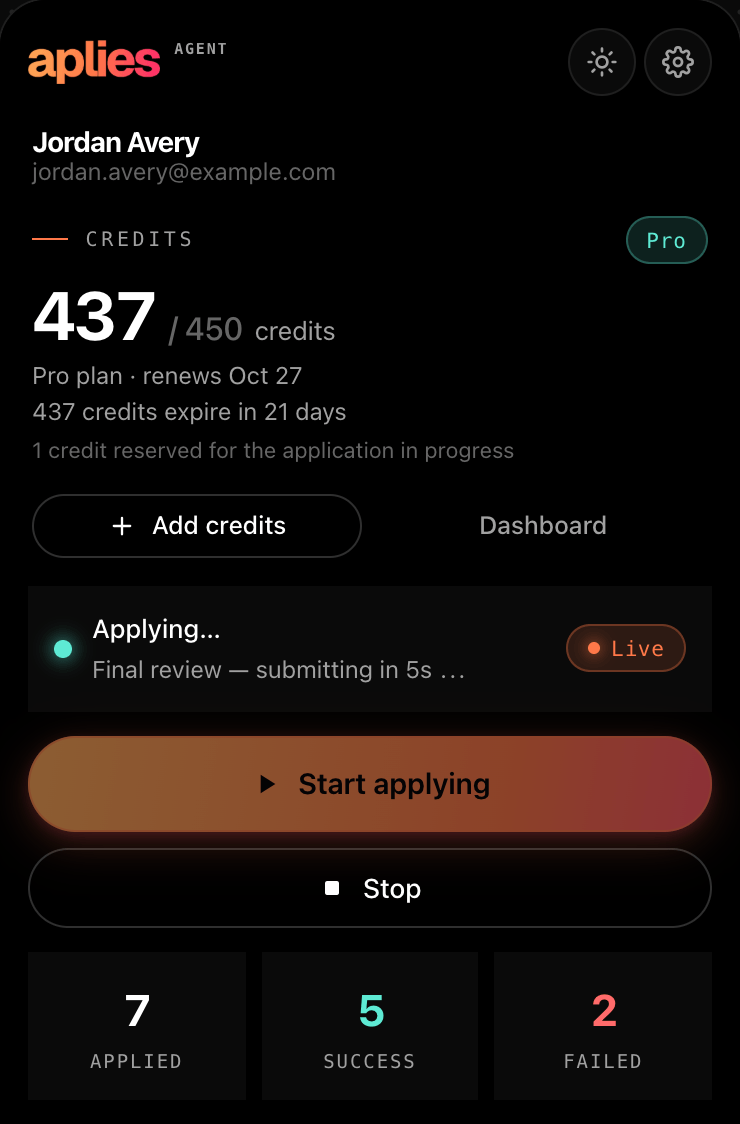
    When a form is filled in, the Agent sets the credit aside for that one application. The popup shows it as reserved.

  2. Charged when it goes out

    Once the application is submitted, the reserved credit is charged. Your dashboard on aplies.com shows what each application cost.

  3. Free if it stops first

    A security check, a sign-in wall, a closed posting, a form it couldn’t finish: anything that stops before submitting costs nothing, however often it happens. A submission that fails with a reason isn’t charged either.

One exception: if no result comes back after the Agent presses Submit — for example, Chrome was closed mid-submit — it is charged and marked as unconfirmed. Support can review it.

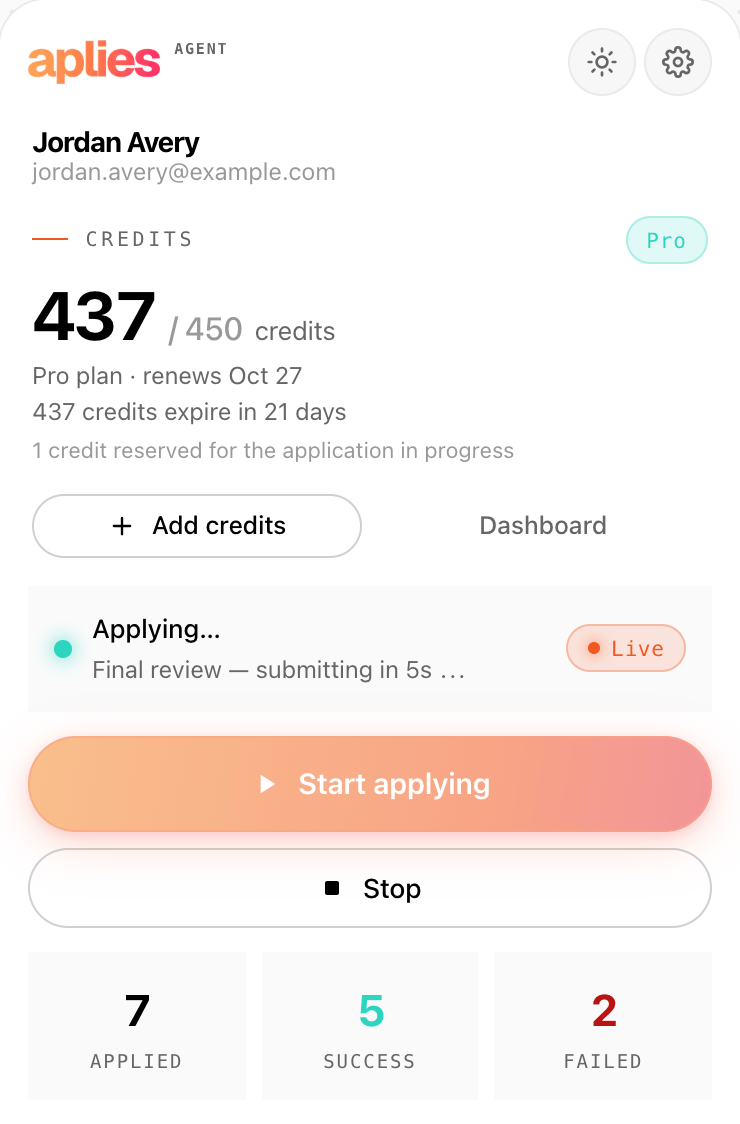
The Aplies Agent popup during a run: “Final review — submitting in 5s”, and 1 credit reserved for the application in progress.
The popup at the final review: one credit reserved for the Easy Apply about to go out.

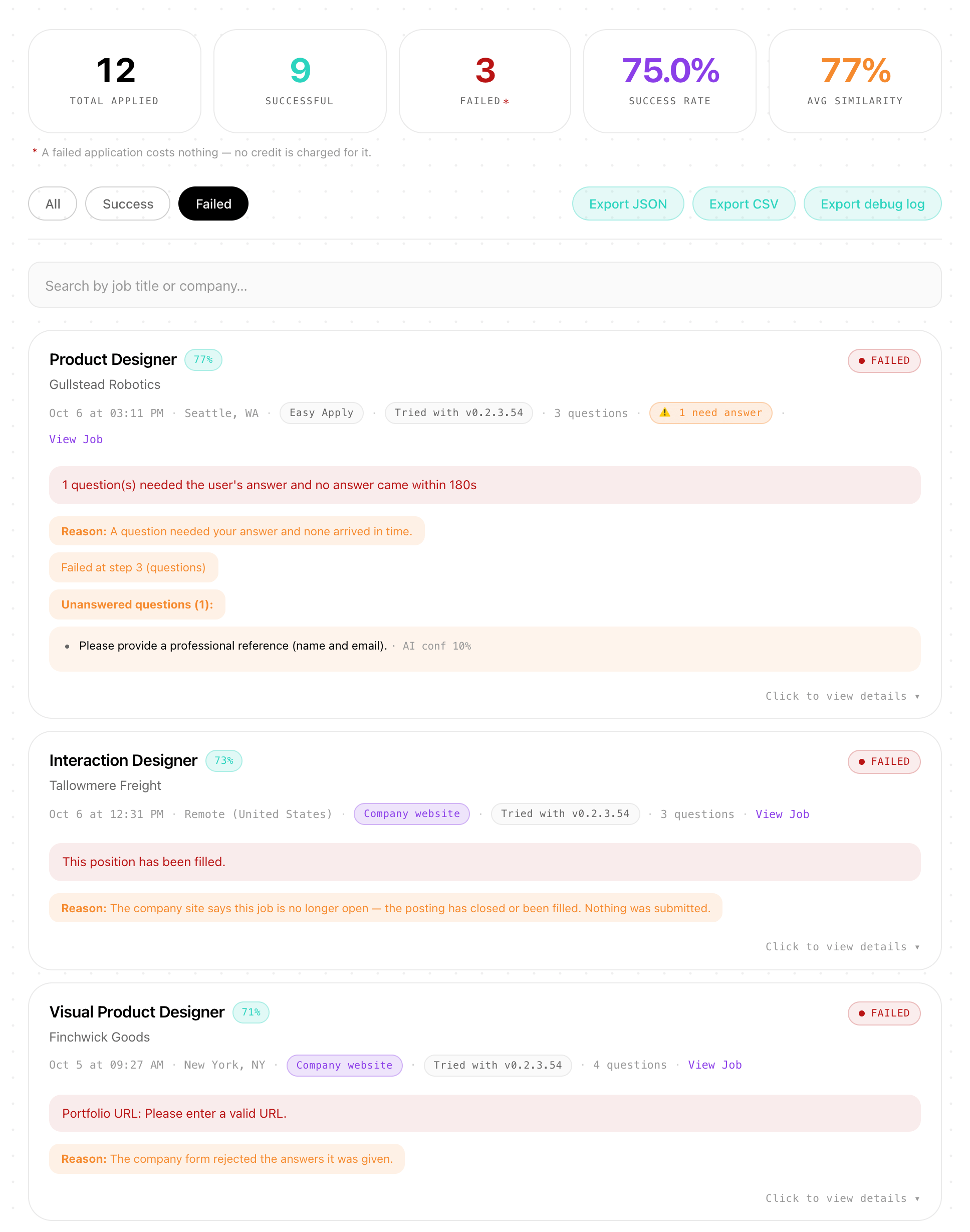
When an application fails, the report says why.

The Agent’s Application Report keeps every attempt, failures included, with the reason in plain words. Whether a credit was charged is shown on your dashboard on aplies.com, on each application's page.

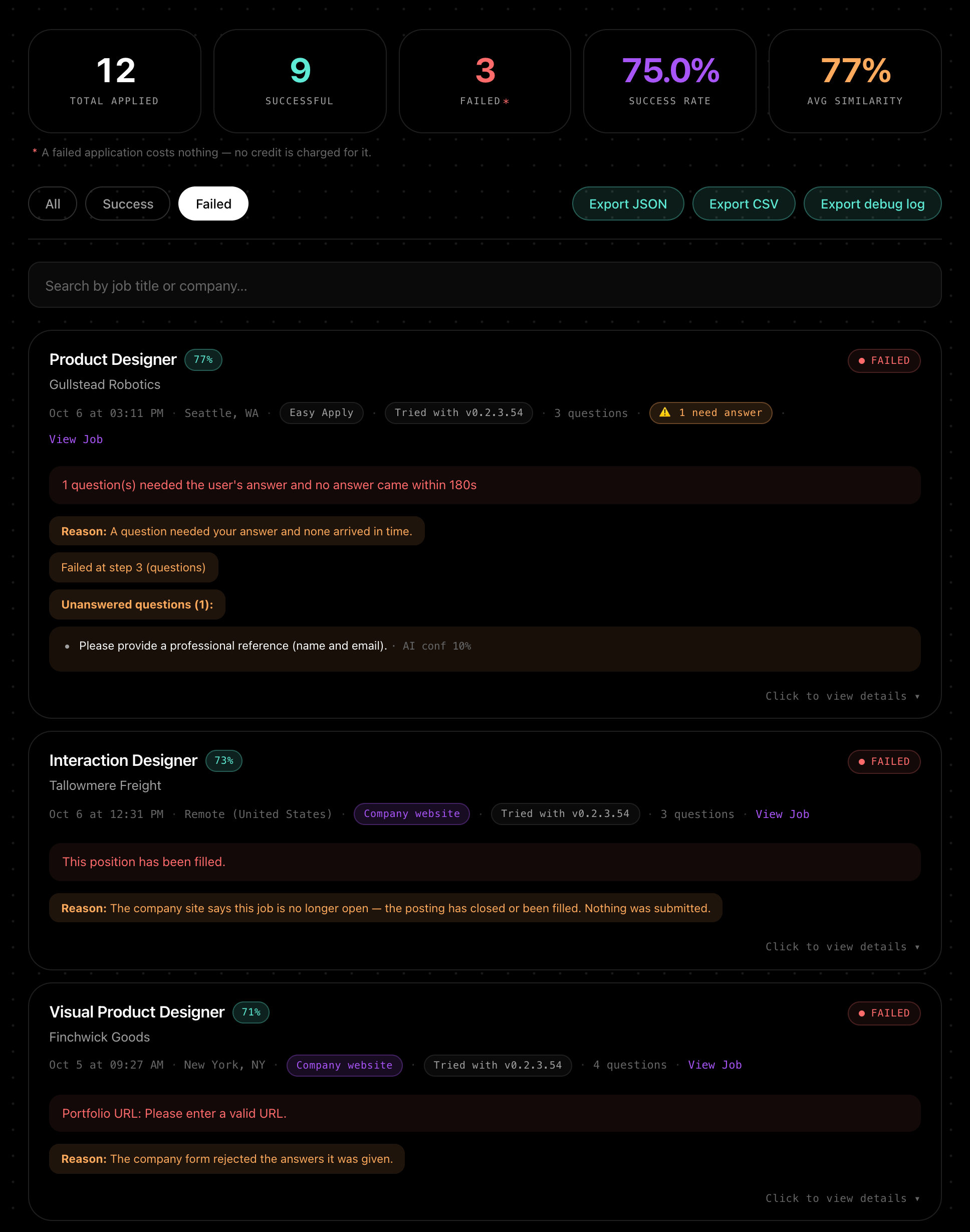
The Agent’s Application Report on the Failed tab: three failed applications, each with its reason, under the note that a failed application costs nothing.
Beyond a plan

How else can you get credits?

10 free credits to start

Verify a phone number on WhatsApp or Telegram and they unlock — no card. Until you do, your dashboard and the Agent show them as locked. Once unlocked they last 30 days, and one number unlocks free credits for one account.

Create your free account

Add credits any time

Buy 30 to 10,000 credits as a one-off, without changing plan — nothing renews. The more you add, the lower the rate per credit, and never above your own plan’s rate. Added credits last at least a month.

Invite someone

You get 1 credit when the person you invite verifies their phone, and 4 more when they first subscribe. You both need a verified phone. Referral credits last 3 months, and the person you invite gets the usual free credits.

You can also send credits to another Aplies account for a 10% fee (at least 2 credits). Free and referral credits can’t be sent.

Questions

Before you choose a plan.

What is a credit?

Credits are what applications cost: 1 for a LinkedIn Easy Apply application, 2 for an application on a company’s careers site. Searching for jobs and scoring them costs nothing — only submitted applications do.

When is an application charged?

When the Agent submits it. A credit is reserved just before it presses Submit and charged when the application goes through. Anything that stops before submitting costs nothing, however often it happens, and a submission that fails with a reason isn’t charged either. If no result comes back after it presses Submit — say Chrome was closed mid-submit — it is charged and marked as unconfirmed, and support can review it.

Is the Agent faster on a bigger plan?

No. Every plan runs the same Agent, with the same AI, at the same human pace and under the same hourly and daily limits. A bigger plan brings more credits — and on monthly Executive and Signature, credits that carry over.

Do credits expire?

Yes. Every credit has a date, and the ones that expire soonest are spent first. On a monthly plan, credits last to the end of the month you paid for; on Executive unused credits carry over one extra month and on Signature two, keeping 90% each time (a 10% carry-over fee), and you’re told 3 days before. On a yearly plan they last the twelve months you paid for. You’re warned 7 days before credits expire, and Settings → Billing shows every date.

Is there a yearly plan?

Yes. Every plan can be paid monthly or yearly. Yearly costs less than twelve monthly payments — the toggle above the plans shows the saving — and the whole year’s credits are added the day you pay.

Can I change plans?

Yes, from Settings → Billing. An upgrade takes effect at once: you pay the difference between the two prices, receive the difference in credits, and keep your renewal date. A downgrade waits for your renewal, or starts now if you choose. Switching from monthly to yearly starts a new year at the full yearly price. The dialog shows the exact figures before anything is charged.

What happens if I cancel?

Your plan keeps working to the end of the period you paid for, and you aren’t charged again. The unused part of the period isn’t refunded. Your credits don’t end with the plan: each batch keeps its own expiry date and can still be spent.

What happens when I run out of credits?

The Agent pauses and tells you, in its popup and with a Chrome notification. Add credits or choose a plan, then press Start again. On a paid plan it also warns you when 80% of the plan’s credits are used.

Do I need my own AI key?

No. The AI is included in every plan and in the free credits. There are no token fees and nothing to sign up for elsewhere.

Where do I see what I was charged?

On your dashboard on aplies.com: each application shows its outcome and the credits charged for it. Settings → Billing shows your balance and when each batch of credits expires.

More answers about the Agent and your data

Try it on your own search.

10 free credits once you verify your phone — no card. Add the Agent to Chrome, connect your account, and pay only for what it submits.